 ShelfReady
Catch KDP metadata mistakes before you publish.
ShelfReady checks your title, subtitle, 7 keywords, description and categories against KDP's rules in one click, right next to your Details page. You get a score out of 100 and a short list of fixes.
No account, no KDP login shared. Nothing about your books is sent to us.
Small metadata mistakes cost weeks
A rejected title means another review cycle. Weak keywords mean nobody finds the book. These are the mistakes ShelfReady catches most often.
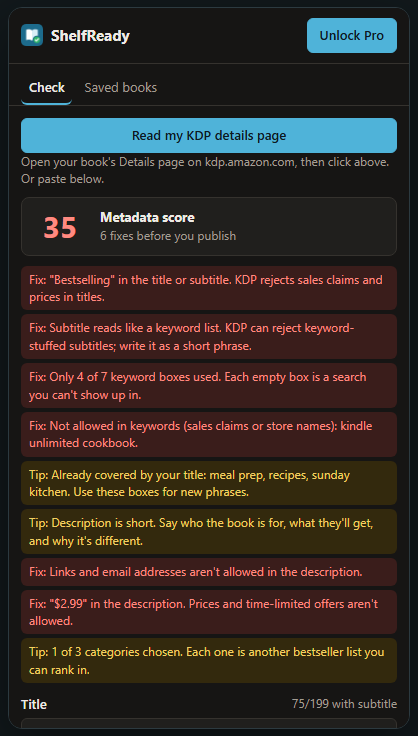
Fix"Bestselling" in the subtitle. KDP rejects sales claims in titles.
FixOnly 4 of 7 keyword boxes used. Each empty box is a search you can't show up in.
Fix"$2.99" and a link in the description. Prices, offers and links aren't allowed.
Tip"meal prep" is already in your title. Use that keyword box for a new phrase.
What ShelfReady checks
Every check follows Amazon's published KDP metadata guidelines.
Title and subtitle
- Under 200 characters combined
- No sales claims like "bestselling" or "free"
- No store or format words like "Kindle" or "eBook"
- Subtitles that read like a keyword list
Keywords
- All 7 boxes used
- None over 50 characters
- No duplicates or banned terms
- No boxes wasted on words already in your title
Description
- Under 4,000 characters
- Only HTML tags KDP supports
- No links, emails, prices or time-limited offers
- Easy to skim
Categories and keyword ideas
- All 3 categories used
- New 2–3 word keyword ideas from your own description, ready to paste
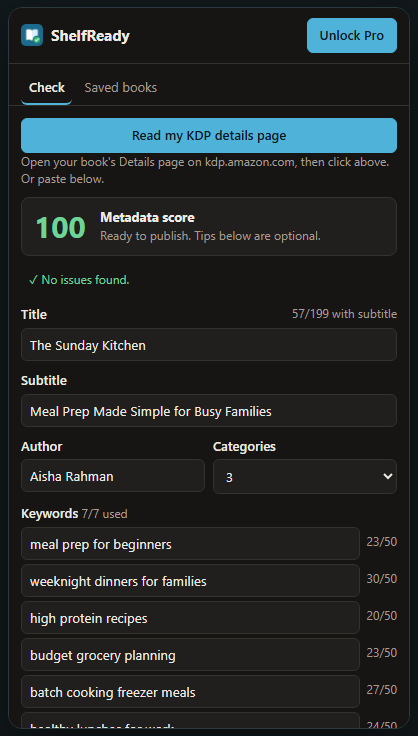
From 35 to ready to publish
Fix what it flags, check again, and watch the score climb.
How it works
- Install ShelfReady for Chrome or Firefox.
- Open your book's Details page on kdp.amazon.com and click the ShelfReady icon. A side panel opens next to the page.
- Click "Read my KDP details page". You get your score, the fixes and keyword ideas. No KDP page handy? Paste your details in by hand.
- Edit in KDP, then check again. Save each book to compare versions.
Pricing
The full score and every check are free, with no account needed.
Free
$0- Full score and every check
- 3 keyword ideas per book
- 3 saved books
Pro
$5/month or $39 once- All keyword ideas
- Unlimited saved books
- All future Pro features
Questions
Does ShelfReady change or submit anything on KDP?
No. It only reads the fields on the page open in your tab and shows suggestions. You make the edits and press Publish yourself.
Do I need to give it my KDP login?
No. It works on the page you're already signed in to, and nothing is sent to us. There's no ShelfReady account.
Does it work for paperbacks and hardcovers?
Yes. The Details page fields are the same for Kindle eBooks, paperbacks and hardcovers.
Does a score of 100 guarantee approval or sales?
No. It means your metadata avoids the common mistakes KDP flags and uses every keyword and category slot. Amazon still reviews every book.
How do I cancel Pro?
Open ShelfReady, click the Pro button at the top, and manage or cancel the subscription from there. The one-time $39 plan never renews.
Check your next book in a minute
Free, no account, nothing leaves your browser.