 ShotSmith
Stop wasting credits on bad AI video prompts.
ShotSmith builds your prompt in the order video models read best and flags the mistakes that ruin a clip, before you press Generate. It sits in a side panel next to Google Flow, Veo or any video tool.
Add to Firefox, it's freeChrome version coming soon. Your prompts and characters stay in your browser.
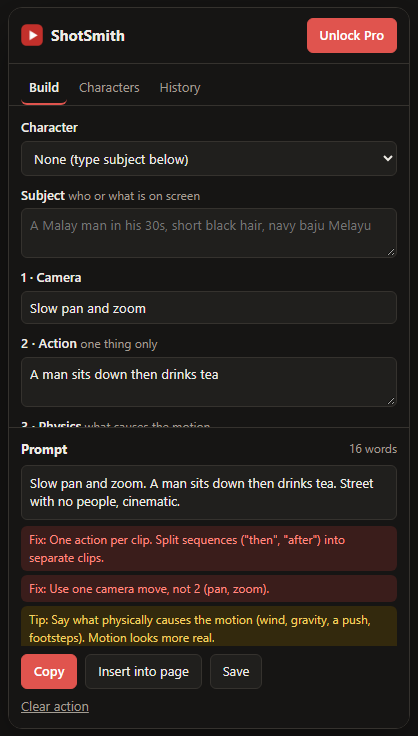
Why your clips come out wrong
Most failed generations come from the same few prompt mistakes. Each one costs you a full set of credits.
Fix"A man sits down then drinks tea." Two actions in one clip. Models blend them or skip one.
Fix"Slow pan and zoom." Two camera moves fight each other. Pick one.
Fix"Street with no people." Models often ignore or invert negative words, so people appear.
TipSteam that "rises" with nothing driving it looks fake. Say what causes the motion: a breeze, gravity, a push.
Build in the right order
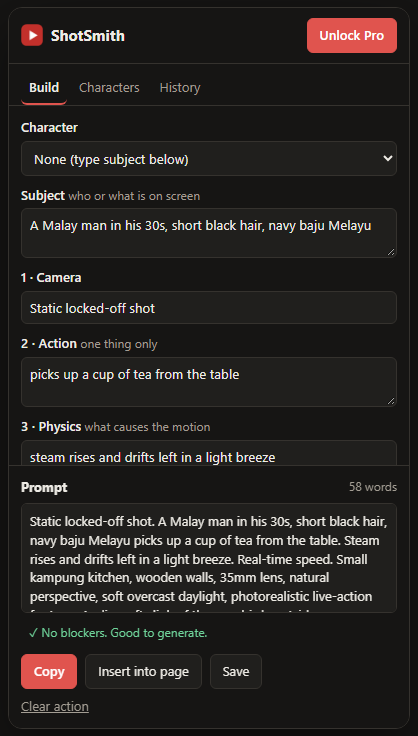
Fill in each field and ShotSmith assembles a clean prompt in this order.
- 1 · Camera
- 2 · Action
- 3 · Physics
- 4 · Pace
- 5 · Look
- 6 · Audio
What ShotSmith does
Catches mistakes
- More than one action per clip
- Clashing camera moves
- Negative wording ("no", "without", "don't")
- Missing cause of motion or audio
- Vague words like "cinematic"
Keeps characters consistent
Save a character once. Every prompt uses the exact same description, so your character looks the same from clip to clip.
Inserts in one click
Send the prompt straight into the prompt box in Google Flow (Veo). On other sites, allow the site once or just copy.
Shows what you waste
Save prompts, mark each result as worked or wasted, and watch your waste rate drop.
From burned credits to "good to generate"
How it works
- Install ShotSmith from Firefox Add-ons.
- Open your video tool and click the ShotSmith icon. A side panel opens next to the page.
- Fill in camera, action, physics and the rest. Fixes and tips appear as you type.
- Insert or copy the prompt, generate, then mark the result to track your waste rate.
Pricing
Every check is free, with no account needed.
Free
$0- All checks
- 2 saved characters
- 10 saved prompts
Pro
$5/month or $29 once- Unlimited characters
- Unlimited prompt history
- All future Pro features
Questions
Which video tools does it work with?
Any tool that takes a text prompt. One-click insert works on Google Flow out of the box. On other sites you allow ShotSmith once, or simply copy the prompt.
Does it generate videos or use my credits?
No. ShotSmith only writes and checks the prompt. You still press Generate in your own tool.
Is there a Chrome version?
It's coming soon. Right now ShotSmith is available for Firefox.
Is my data sent anywhere?
No. Prompts, characters and history are stored in your browser. Payments are handled by ExtensionPay and Stripe.
How do I cancel Pro?
Open ShotSmith, click the Pro button at the top, and manage or cancel the subscription from there. The one-time $29 plan never renews.
Get your next clip right the first time
Free, no account, nothing leaves your browser.
Add to Firefox, it's free